Tips for Searching WJMO Documents with Ease.
Limit your search to WJMO documents:
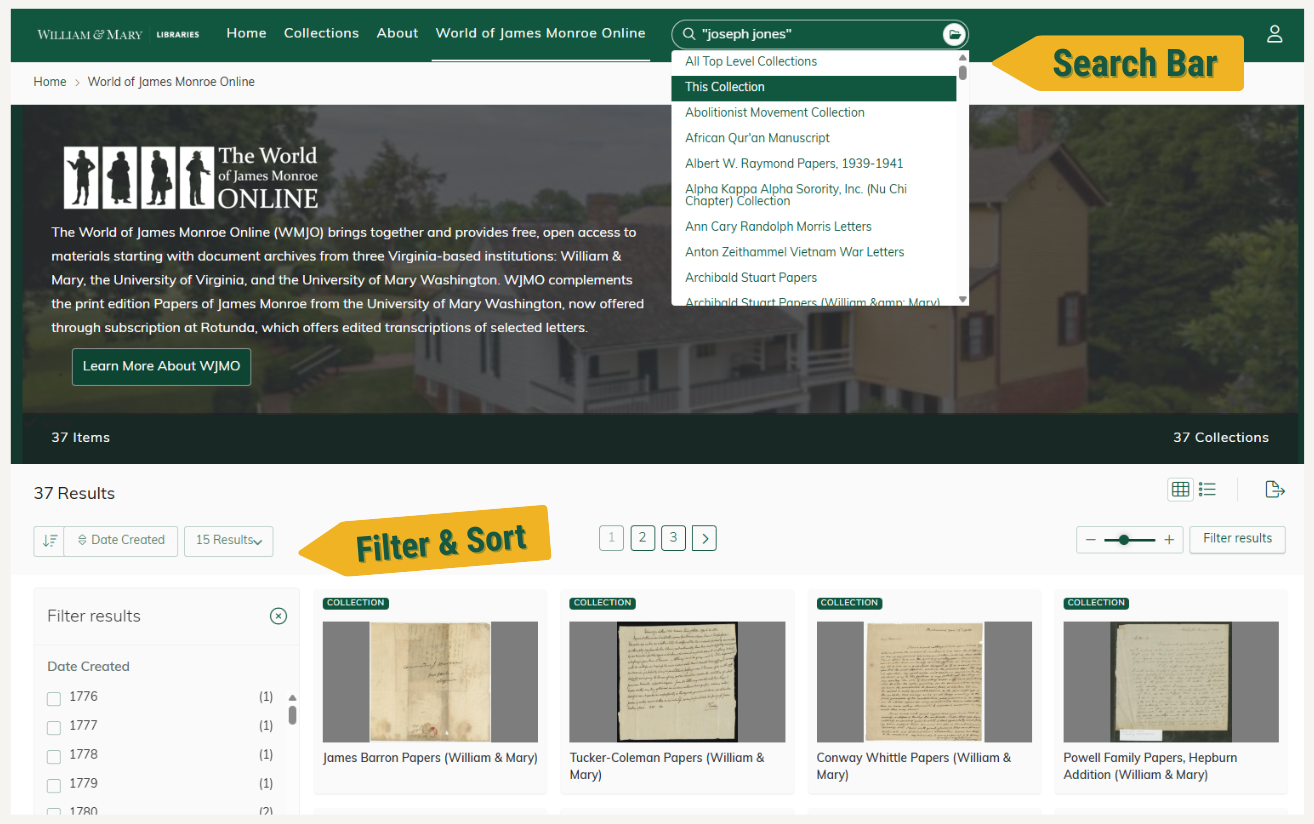
On the WJMO homepage, click the search bar in the top menu and select “This Collection” to restrict your search to WJMO documents only.
Searching:
All searches are full‑text and include both the document’s metadata record and its transcription.
Start a new search:
Click “World of James Monroe Online” in the top menu to return to the WJMO collection, then re-select “This Collection” from the search bar’s dropdown menu.
Search for a known correspondent or person:
Enter names in quotation marks to search for an exact match, e.g., "Joseph Jones".
Keyword search within a document:
Use Ctrl + F to find specific terms within a transcription.
Narrow your results using facets:
After running a search, use the Filter Results sidebar to refine your results. Filters include creator/contributor, year created, genre, and more.
Sort results:
Sorting options appear above the Filter Results sidebar. You can sort by Date Created, Title, Relevance, and choose either ascending or descending order.